|
Archiver - DJ Java Decompiler Tool |

Included in DJ Java Decompiler "Archiver" tool is a simple archive file manager wich enables users to work with .JAR, .ZIP, .APK, .WAR, .EAR and .EXE archives. This tool lets you create or view archives, extract files from archives, decompile .class files from archives, etc. The option "Use folder names stored in archive" enables users to decompile whole class tree.
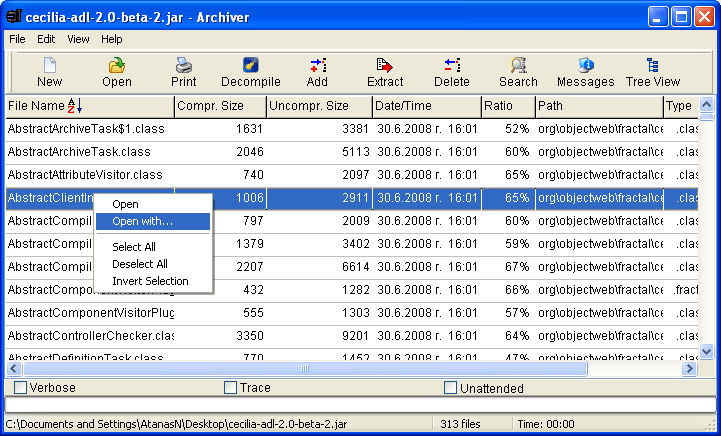
Based on Eric Engler's Zip 1.6p beta package.
To decompile a .JAR file: Select "File" -> "Open" and load your desired jar file. This jar file will be loaded in the "Archiver" tool. Use "Archiver" tool to decompile a single class file inside the selected archive or all class tree. To decompile a single class file inside the JAR archive - just double-click the class file.
To decompile all class files:
- Choose the decompiled output files extension (.jad, .java) from "View" - > "Output file extension".
- Select all the .class files you want.
- Select the target (destination) folder.
- Click on "Decompile" button.
- Next, you will be prompted to confirm that you want to use folder (path) names stored in the arhcive.
- Click "Yes".
- Selected .class files will be extracted in the selected target (destination) folder with folder names stored in the archive. They will be decompiled according to package names of classes.
To decompile .APK or .DEX files: Somewhere on the Internet there is an utility called dex2jar. Use it in conjunction with DJ Java Decompiler or with the Archiver tool. Alternatively you can use AndroChef Java Decompiler
Back to DJ Java Decompiler home page: http://www.neshkov.com/dj.html or visit another Atanas Neshkov Ltd.r site.
Download DJ Java Decompiler and start using now!
The files are digitally signed with VeriSign Digital ID Class 3 - Microsoft Software Validation v2

DJ Java Decompiler has successfully passed Microsoft-designed tests for compatibility and reliability with Windows® 7 and received "Compatible with Windows 7" logo.